Creator Campaign Management
B2B SaaS platform for managing influencer campaigns end-to-end, from campaign creation and deal structuring to deliverable tracking and payments. Built from zero with a 2-person team.
4 Months
Product Designer
Platform: iOS & Android
The problem we were solving
Brands managing creators in spreadsheets
The creator economy is growing fast, but the operational side of managing campaigns is still stuck in spreadsheets, DMs, and manual email threads. Organizations working with multiple creators face real bottlenecks every day.
"We talked to a brand that was managing 30+ creators using a Google Sheet. Payments were late, deliverables were getting lost, and no one had a clear view of what was live or what was pending."
Time lost to manual work
Tracking deliveries, chasing creators via DM, updating spreadsheets that were always out of date.
Payment chaos
No structure meant late payments, unclear terms, and disputes, all living in scattered email threads.
No scalability
Adding more creators meant adding more complexity. The tools broke before the campaigns could grow.
Zero performance visibility
No way to connect content to results. The link between creator activity and actual revenue was invisible.
Campaign creation
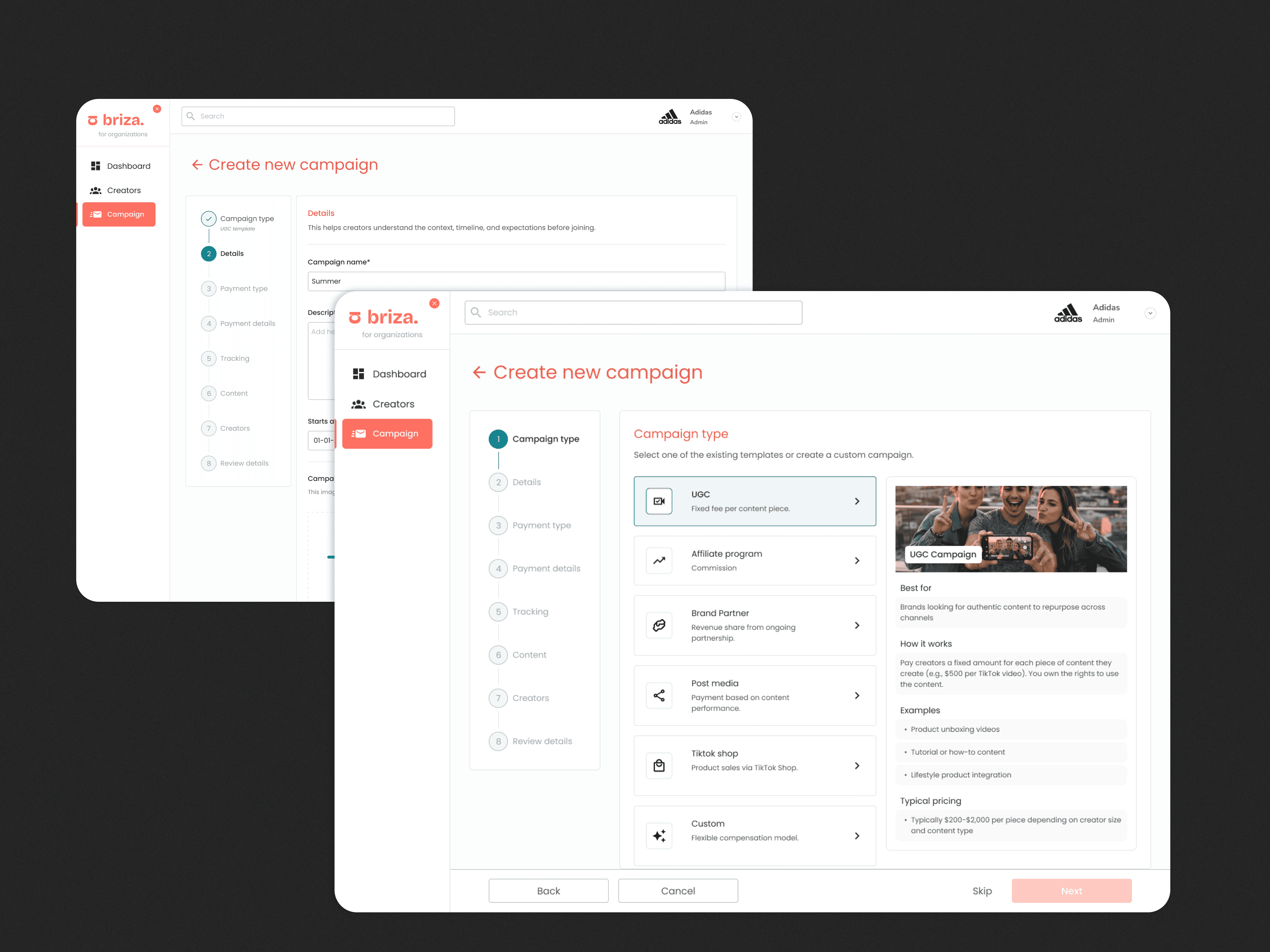
One key design decision: when a user selects a campaign type, a contextual panel appears on the right explaining exactly what that type is, who it's best for, how pricing typically works, and real examples. This reduced the need for users to leave the platform to research campaign models.
Making complexity feel manageable
The campaign creation flow was the hardest design challenge. Brands need to configure campaign type, payment models, tracking, content specs, and creator approval, all at once. We broke it into an 8-step guided flow where each step owns a single concern. All steps are skippable and fully editable after launch.
A key decision: when a campaign type is selected, a contextual panel appears with a plain-language explanation of how it works, typical pricing, and real examples. Most brands exploring creator marketing for the first time don't know the difference between a UGC campaign and an affiliate program, we put the education directly in the flow instead of sending them to a help center.
Creator management
From adding creators to approving them
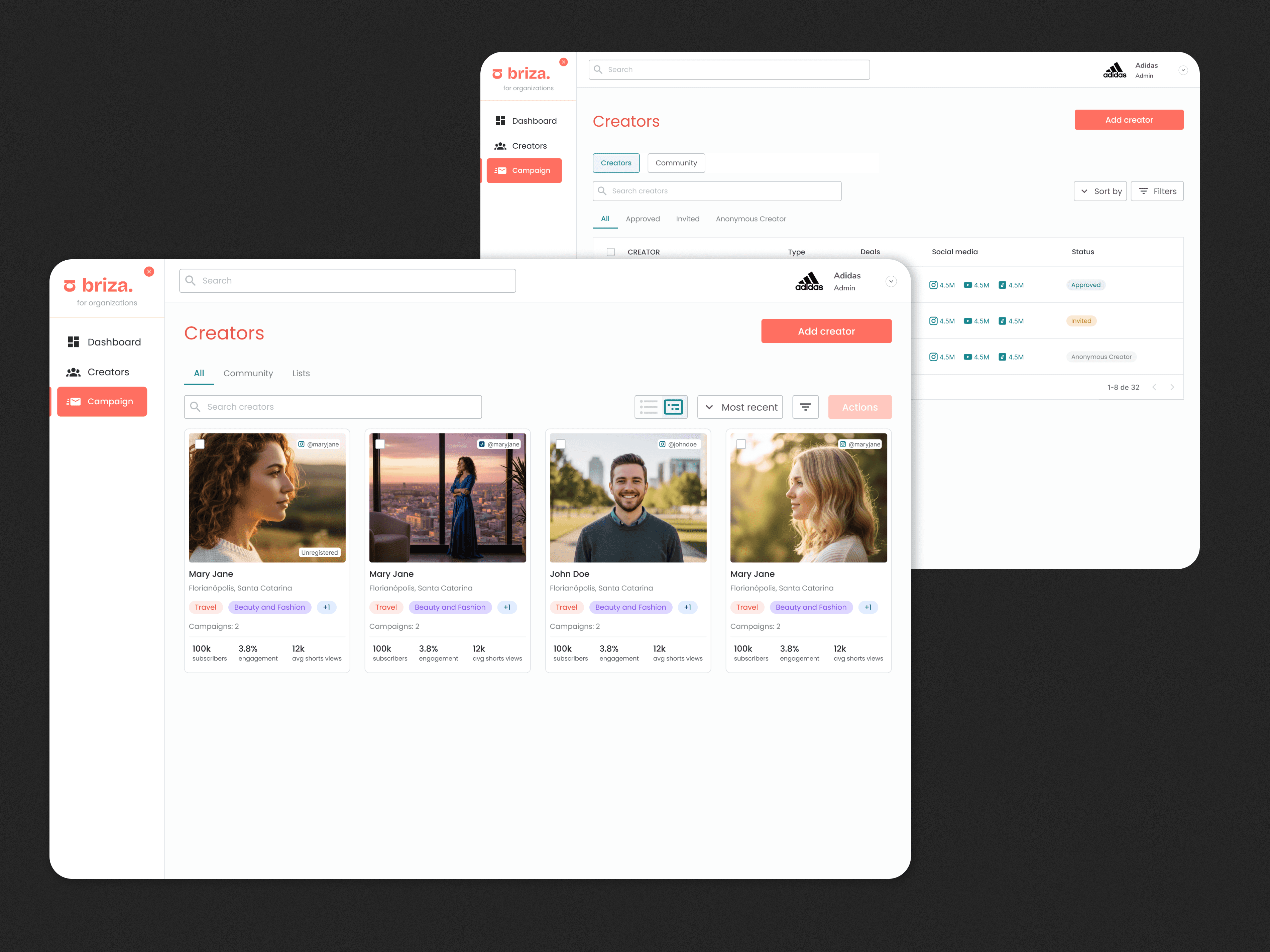
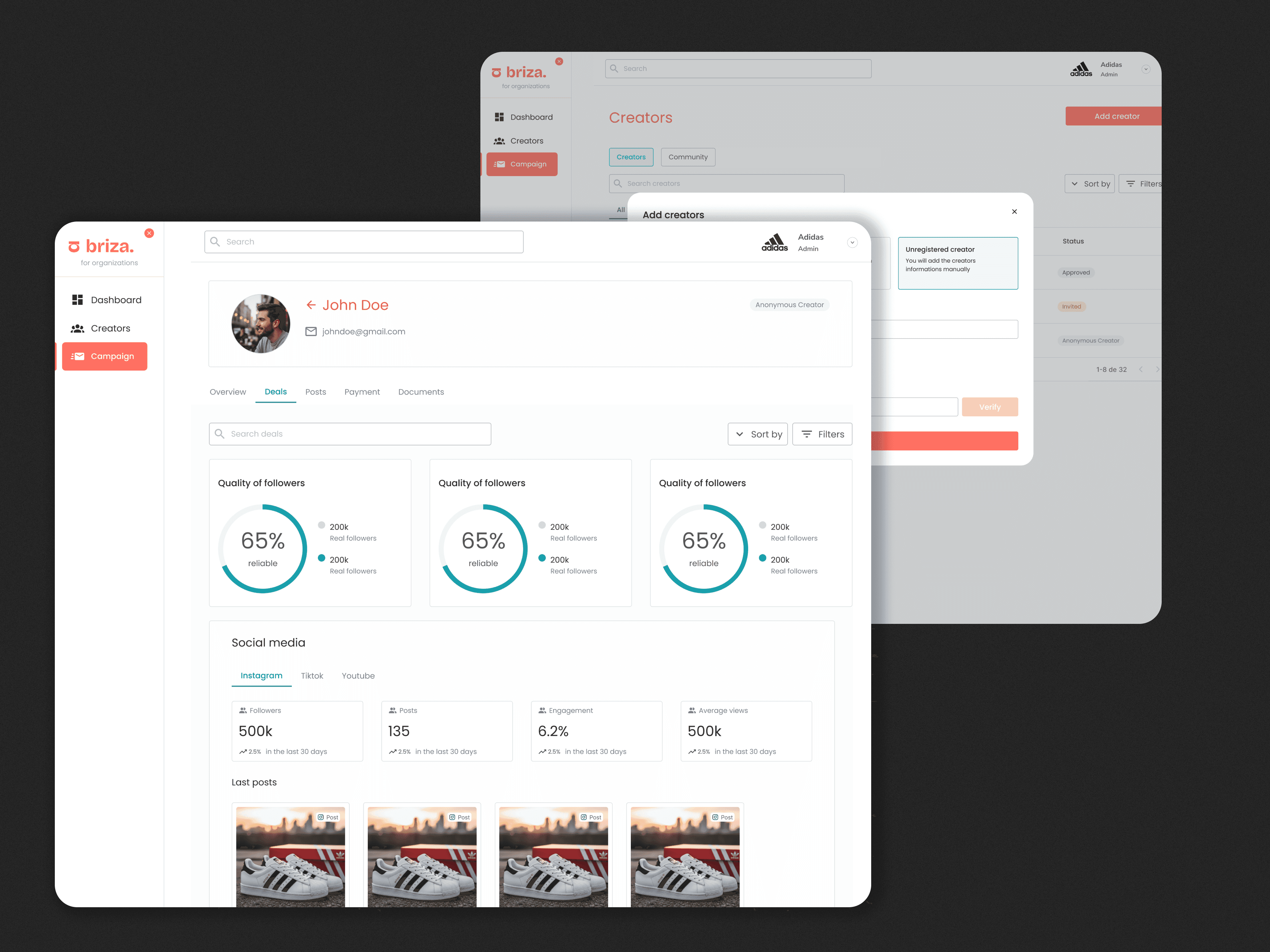
Organizations can add creators three ways: invitation link, direct email, or manually. Once added, they can configure a custom application form, with sections, short text, long text, multiple choice, and file upload, to screen creators before approving them for a campaign.
Deliverables & Payments
The operational layer brands were missing
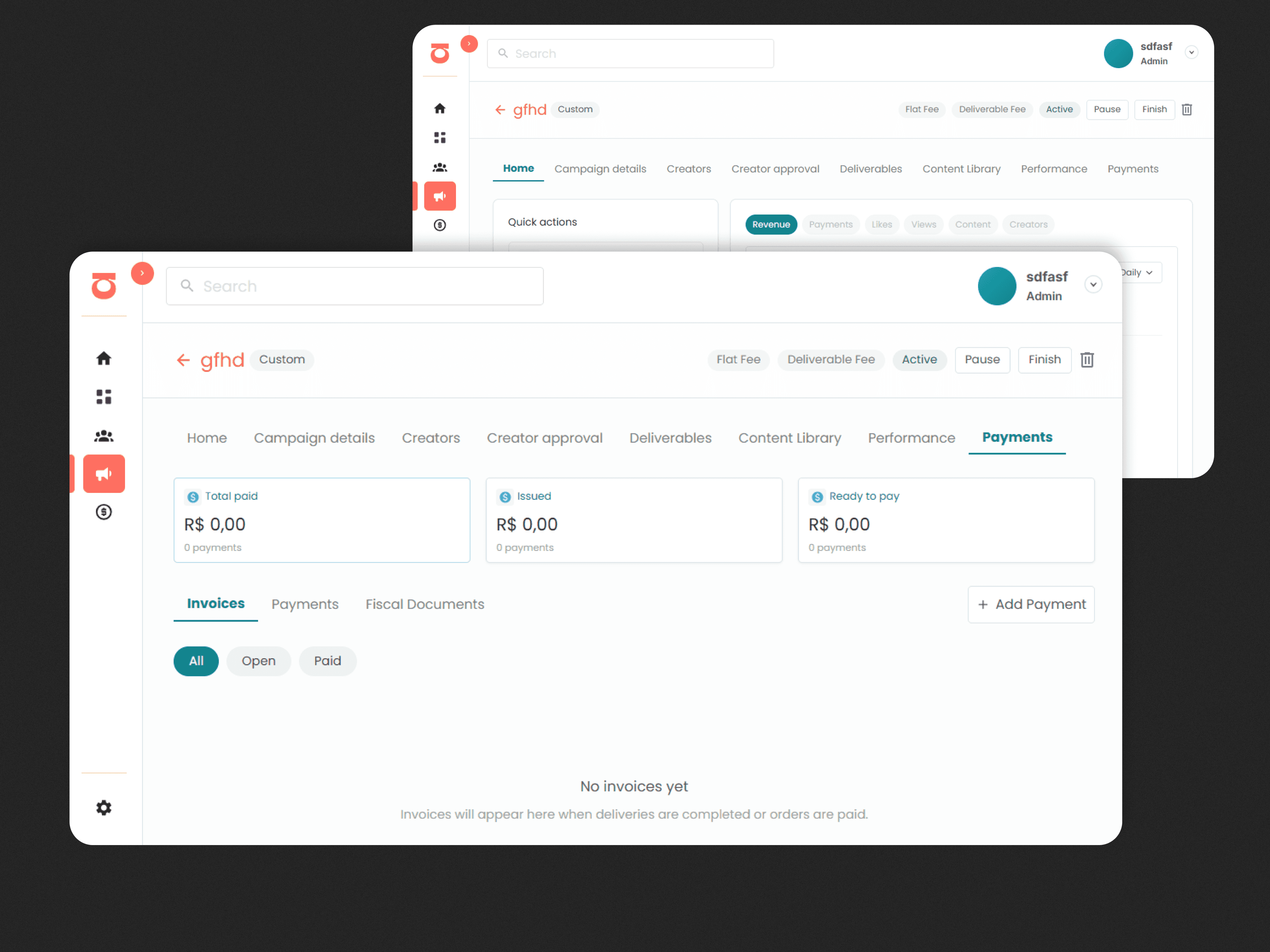
The deliverables tab tracks what each creator has delivered, what's late, and what still needs review, replacing the spreadsheet entirely. When delivery tracking is enabled, the platform auto-generates payment invoices based on delivery events.
Payments run on a provider-agnostic internal ledger. Individual payment issues accumulate in a rolling invoice, one open invoice per creator at a time. The brand confirms and pays; funds are allocated via ledger entries. Each payment type has its own trigger logic: fixed fees generate on deal creation, deliverable fees on content submission, revenue share per order.
What I learned
Complexity has to be earned
6 campaign types, 6 payment models, multi-platform tracking. The design challenge was making sure users never felt it — single-concern steps and contextual guidance at every decision point.
Flexibility and clarity are in tension
Supporting every configuration without creating a different experience for each one required constant restraint. The temptation to add more options is always there.
The operational layer is underdesigned
Most creator tools focus on discovery. Briza bets on operations. Designing for deliverables, payments, and tracking required understanding real workflows, not just building screens.
Product thinking shapes design decisions
Working on both product and design meant every UI decision had to hold up to the question: why does this exist? The roadmap and data model informed everything I designed.
The problem we were solving
Brands managing creators in spreadsheets
The creator economy is growing fast, but the operational side of managing campaigns is still stuck in spreadsheets, DMs, and manual email threads. Organizations working with multiple creators face real bottlenecks every day.
"We talked to a brand that was managing 30+ creators using a Google Sheet. Payments were late, deliverables were getting lost, and no one had a clear view of what was live or what was pending."
Time lost to manual work
Tracking deliveries, chasing creators via DM, updating spreadsheets that were always out of date.
Payment chaos
No structure meant late payments, unclear terms, and disputes, all living in scattered email threads.
No scalability
Adding more creators meant adding more complexity. The tools broke before the campaigns could grow.
Zero performance visibility
No way to connect content to results. The link between creator activity and actual revenue was invisible.
Campaign creation
One key design decision: when a user selects a campaign type, a contextual panel appears on the right explaining exactly what that type is, who it's best for, how pricing typically works, and real examples. This reduced the need for users to leave the platform to research campaign models.
Making complexity feel manageable
The campaign creation flow was the hardest design challenge. Brands need to configure campaign type, payment models, tracking, content specs, and creator approval, all at once. We broke it into an 8-step guided flow where each step owns a single concern. All steps are skippable and fully editable after launch.
A key decision: when a campaign type is selected, a contextual panel appears with a plain-language explanation of how it works, typical pricing, and real examples. Most brands exploring creator marketing for the first time don't know the difference between a UGC campaign and an affiliate program, we put the education directly in the flow instead of sending them to a help center.
Creator management
From adding creators to approving them
Organizations can add creators three ways: invitation link, direct email, or manually. Once added, they can configure a custom application form, with sections, short text, long text, multiple choice, and file upload, to screen creators before approving them for a campaign.
Deliverables & Payments
The operational layer brands were missing
The deliverables tab tracks what each creator has delivered, what's late, and what still needs review, replacing the spreadsheet entirely. When delivery tracking is enabled, the platform auto-generates payment invoices based on delivery events.
Payments run on a provider-agnostic internal ledger. Individual payment issues accumulate in a rolling invoice, one open invoice per creator at a time. The brand confirms and pays; funds are allocated via ledger entries. Each payment type has its own trigger logic: fixed fees generate on deal creation, deliverable fees on content submission, revenue share per order.
What I learned
Complexity has to be earned
6 campaign types, 6 payment models, multi-platform tracking. The design challenge was making sure users never felt it — single-concern steps and contextual guidance at every decision point.
Flexibility and clarity are in tension
Supporting every configuration without creating a different experience for each one required constant restraint. The temptation to add more options is always there.
The operational layer is underdesigned
Most creator tools focus on discovery. Briza bets on operations. Designing for deliverables, payments, and tracking required understanding real workflows, not just building screens.
Product thinking shapes design decisions
Working on both product and design meant every UI decision had to hold up to the question: why does this exist? The roadmap and data model informed everything I designed.