Redesigning checkout for returning customers
A checkout that was losing customers at the finish line
3 Months
Product Designer
Platform: iOS & Android
Results
Overview
Pearson Assessments is a B2B platform where psychologists, clinicians, and educators purchase assessment materials — tests, kits, and digital tools used in professional practice. The buying process is inherently complex: products require professional qualification verification, orders can contain physical and digital items, and accounts may be either personal or organisational.
Despite strong top-of-funnel performance, users were abandoning the process when they reached checkout. The question wasn't why people wanted to buy — it was why they were giving up right before completing the purchase.
"Customers were ready to buy. The checkout itself was the obstacle."
The Problem
A one-size-fits-all checkout for a complex B2B context
The existing checkout treated every purchase the same way, a long, sequential form requiring users to fill in all details from scratch every time. For a B2B audience that often purchases regularly and has consistent billing and shipping information, this created unnecessary friction.
Pearson Assessments is a B2B platform where psychologists, clinicians, and educators purchase assessment materials, tests, kits, and digital tools used in professional practice. The buying process is inherently complex: products require professional qualification verification, orders can contain physical and digital items, and accounts may be either personal or organisational.
Despite strong top-of-funnel performance, users were abandoning the process when they reached checkout. The question wasn't why people wanted to buy, it was why they were giving up right before completing the purchase.
Before
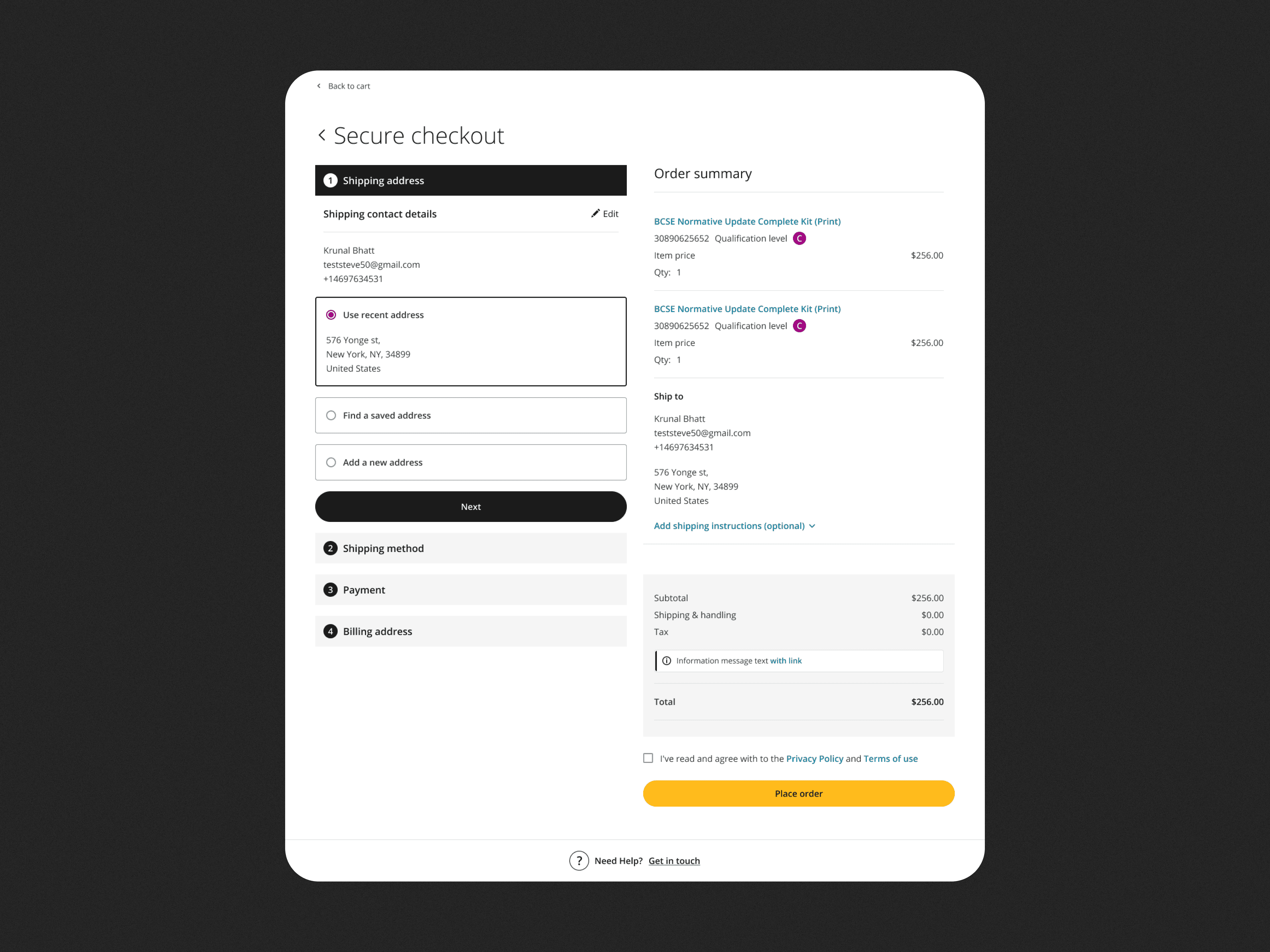
Complex account logic with no guidance
Users could be ordering under a personal or organisational account, each with different requirements (like invoice details and qualified user selection), but the UI didn't adapt to context.
Re-entering the same data repeatedly
Returning customers had to fill in their shipping address, invoice details, and payment method on every order — even when nothing had changed.
High drop-off at the payment stage
By the time users reached payment, the effort required had already eroded motivation — leading to abandonment at the most critical step.
Design exploration
Three concepts, one clear direction
I explored three distinct approaches to restructuring the checkout experience. Each concept addressed the core tension differently: how to handle the wide range of user states (personal vs. organisational account, complete vs. incomplete saved data) without overwhelming users who just want to place an order quickly.
The third concept was selected because it directly addressed the root cause of abandonment: the effort required to repeat information the system already knew. It also scaled elegantly — for first-time users, the same layout guides them through each section step by step.
Concept 1
Flat, all-at-once layout
Not chosen
All sections visible simultaneously on a single page. Familiar but offered no differentiation between first-time and returning users.
Concept 2
Step-by-step accordion
Not chosen
A guided stepper that walked users through each section sequentially. Reduced cognitive load but slowed down returning customers who already had saved data.
Concept 3
Context-aware express checkout
Chosen
A smart layout that detects returning users and pre-fills all known data, allowing them to review and place an order with minimal interaction.
Design exploration
Three concepts, one clear direction
I explored three distinct approaches to restructuring the checkout experience. Each concept addressed the core tension differently: how to handle the wide range of user states (personal vs. organisational account, complete vs. incomplete saved data) without overwhelming users who just want to place an order quickly.
The Solution
Express checkout for returning customers
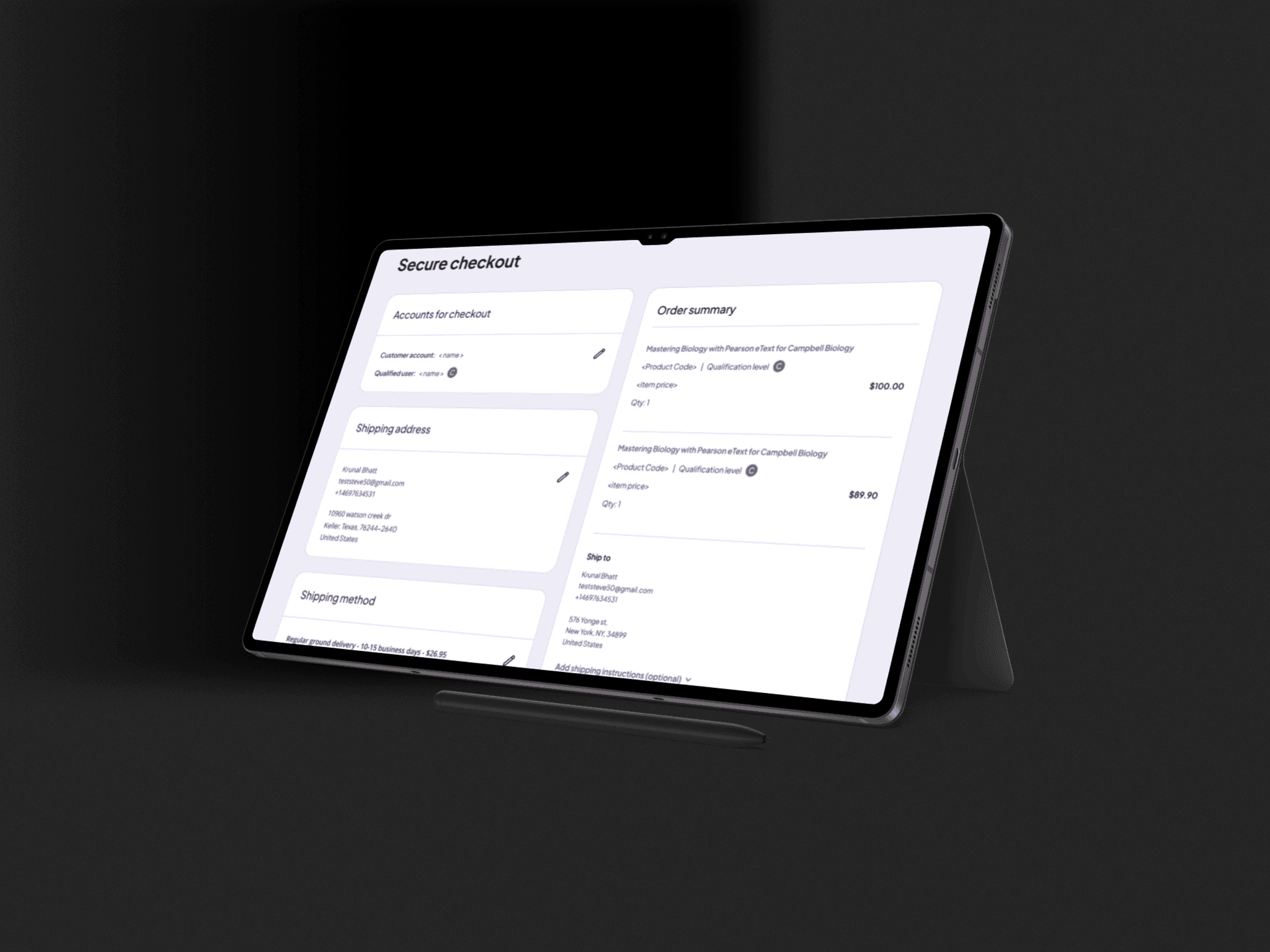
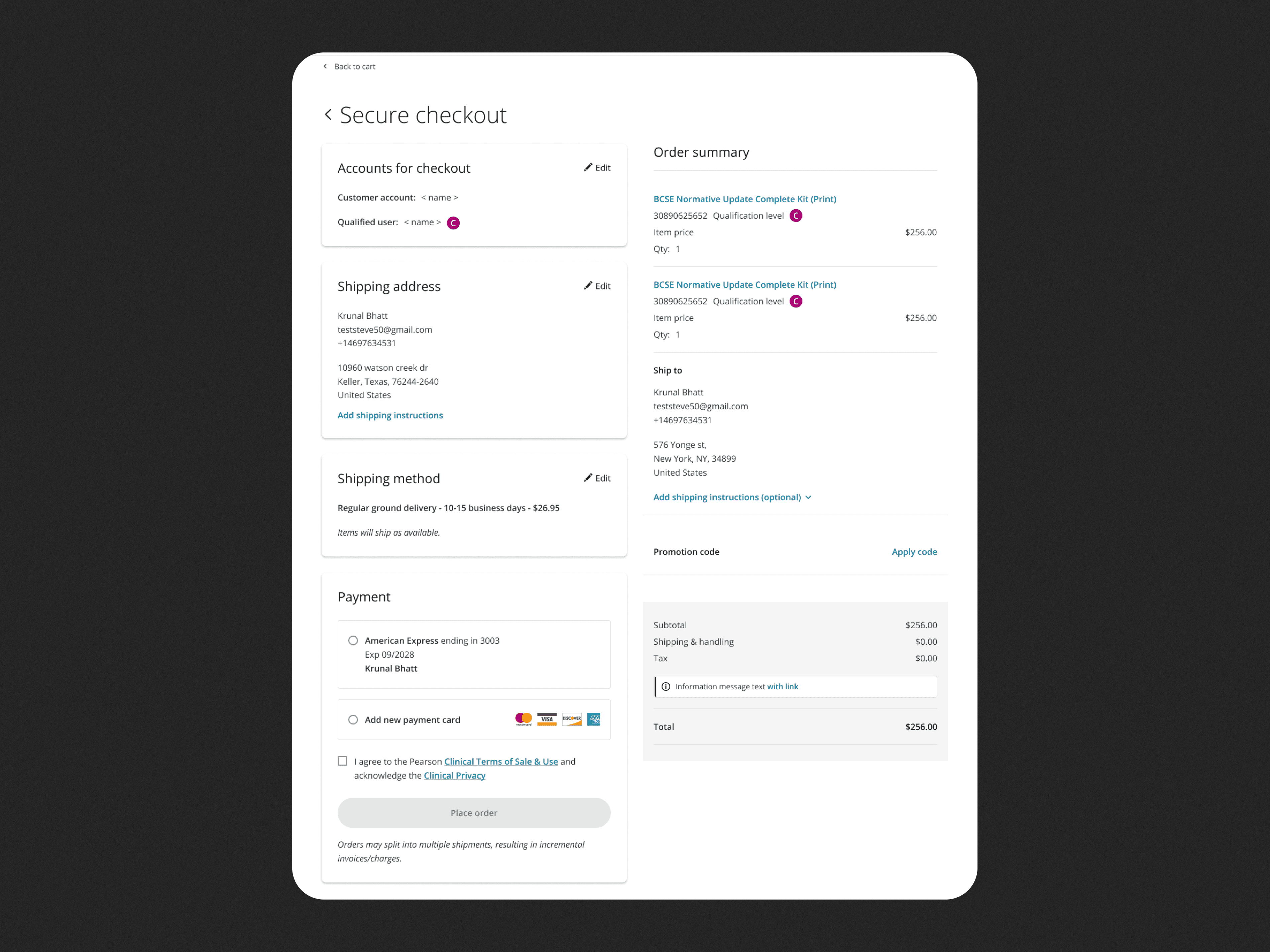
The final design introduces two distinct checkout experiences based on the user's purchase history. If a customer has never ordered before, they go through the regular checkout. If they have previous orders, they are redirected to an express version, with all known data already populated and ready to confirm.
How it works
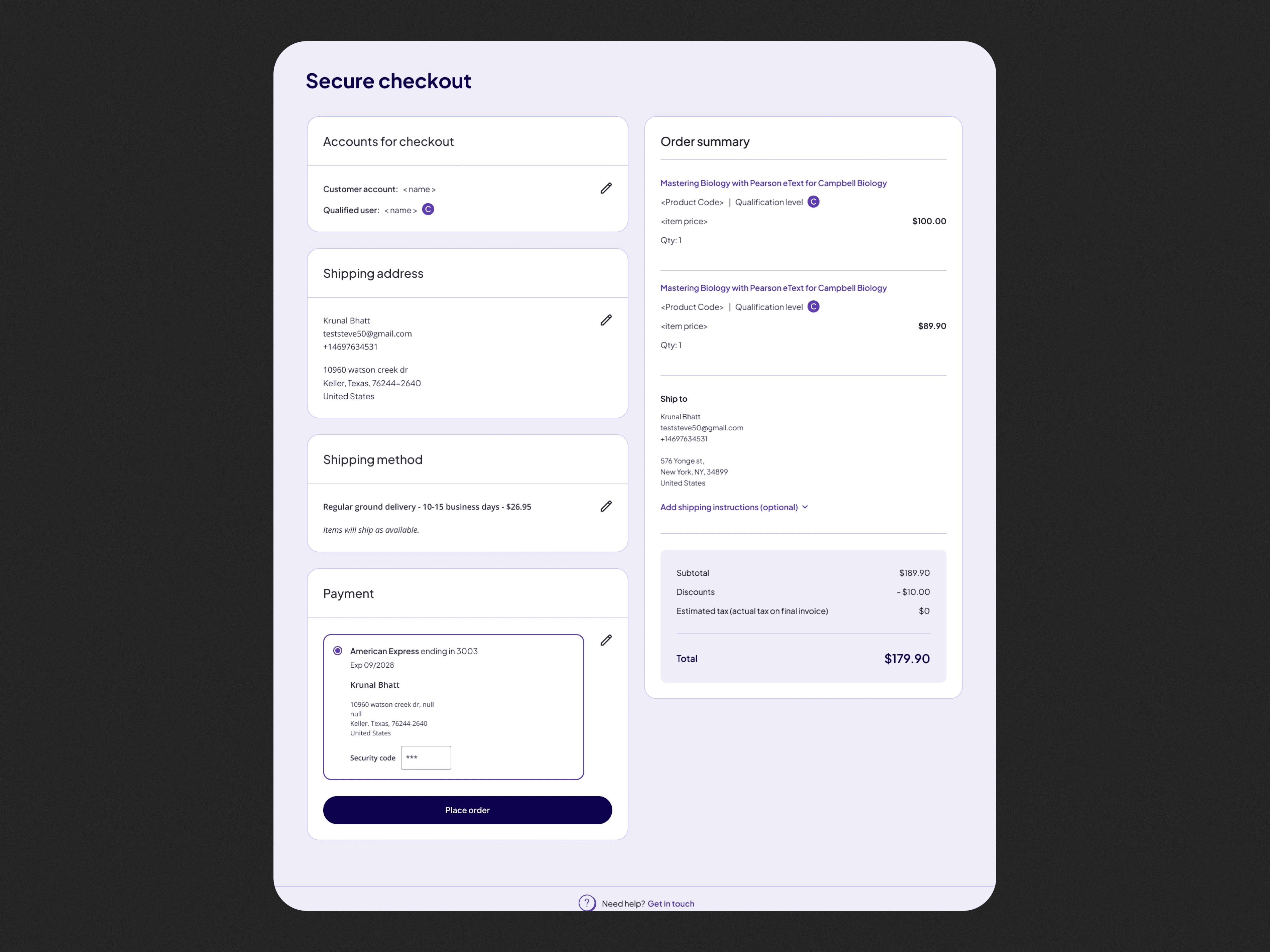
On arrival, the system detects whether the user has prior orders. Returning users land on a pre-filled checkout page showing their saved account, shipping address, shipping method, invoice details (for organisational accounts), and payment method — all ready to review at a glance.
Every section is editable via an inline Edit action, so users can update any detail without navigating away. If all information is correct, they can place the order in seconds.
Pre-filled data for returning users
Account, shipping, invoice, and payment details are all automatically populated from previous orders.
Inline editing without losing context
Users can edit any section directly on the page and see the updated order summary in real time.
Context-aware layout
Personal accounts see a simplified layout. Organisational accounts get invoice details and qualified user fields automatically.
Graceful handling of incomplete data
If any required information is missing, only that section prompts for input — the rest remains pre-filled.
The key insight: returning customers don't need a form, they need a confirmation screen.
Outcome
Reducing effort at the most critical moment
The express checkout concept was approved and moved into development. By eliminating redundant data entry for returning customers, the redesign directly targets the point of highest abandonment, the moment when effort outweighs motivation.
What Came Next
The checkout evolved alongside a brand transformation
After the express checkout shipped, the company went through a broader rebranding of the platform. I was part of that process, applying the new visual identity across the product, including the checkout flows I had originally designed.
The rebranding introduced a refined colour palette (a deep blue-violet replacing the previous navy), updated typography, and a more polished component style with softer card treatments and cleaner form elements. The structural decisions made during the original redesign held up through the transition, the layout logic, the pre-fill behaviour, and the inline edit pattern all remained intact.
Working across both the UX redesign and the subsequent rebrand gave me a fuller view of the product lifecycle, from solving a core usability problem to maintaining design consistency as the brand matured.
Results
Overview
Pearson Assessments is a B2B platform where psychologists, clinicians, and educators purchase assessment materials — tests, kits, and digital tools used in professional practice. The buying process is inherently complex: products require professional qualification verification, orders can contain physical and digital items, and accounts may be either personal or organisational.
Despite strong top-of-funnel performance, users were abandoning the process when they reached checkout. The question wasn't why people wanted to buy — it was why they were giving up right before completing the purchase.
"Customers were ready to buy. The checkout itself was the obstacle."
The Problem
A one-size-fits-all checkout for a complex B2B context
The existing checkout treated every purchase the same way, a long, sequential form requiring users to fill in all details from scratch every time. For a B2B audience that often purchases regularly and has consistent billing and shipping information, this created unnecessary friction.
Pearson Assessments is a B2B platform where psychologists, clinicians, and educators purchase assessment materials, tests, kits, and digital tools used in professional practice. The buying process is inherently complex: products require professional qualification verification, orders can contain physical and digital items, and accounts may be either personal or organisational.
Despite strong top-of-funnel performance, users were abandoning the process when they reached checkout. The question wasn't why people wanted to buy, it was why they were giving up right before completing the purchase.
Before
Complex account logic with no guidance
Users could be ordering under a personal or organisational account, each with different requirements (like invoice details and qualified user selection), but the UI didn't adapt to context.
Re-entering the same data repeatedly
Returning customers had to fill in their shipping address, invoice details, and payment method on every order — even when nothing had changed.
High drop-off at the payment stage
By the time users reached payment, the effort required had already eroded motivation — leading to abandonment at the most critical step.
Design exploration
Three concepts, one clear direction
I explored three distinct approaches to restructuring the checkout experience. Each concept addressed the core tension differently: how to handle the wide range of user states (personal vs. organisational account, complete vs. incomplete saved data) without overwhelming users who just want to place an order quickly.
The third concept was selected because it directly addressed the root cause of abandonment: the effort required to repeat information the system already knew. It also scaled elegantly — for first-time users, the same layout guides them through each section step by step.
Concept 1
Flat, all-at-once layout
Not chosen
All sections visible simultaneously on a single page. Familiar but offered no differentiation between first-time and returning users.
Concept 2
Step-by-step accordion
Not chosen
A guided stepper that walked users through each section sequentially. Reduced cognitive load but slowed down returning customers who already had saved data.
Concept 3
Context-aware express checkout
Chosen
A smart layout that detects returning users and pre-fills all known data, allowing them to review and place an order with minimal interaction.
Design exploration
Three concepts, one clear direction
I explored three distinct approaches to restructuring the checkout experience. Each concept addressed the core tension differently: how to handle the wide range of user states (personal vs. organisational account, complete vs. incomplete saved data) without overwhelming users who just want to place an order quickly.
The Solution
Express checkout for returning customers
The final design introduces two distinct checkout experiences based on the user's purchase history. If a customer has never ordered before, they go through the regular checkout. If they have previous orders, they are redirected to an express version, with all known data already populated and ready to confirm.
How it works
On arrival, the system detects whether the user has prior orders. Returning users land on a pre-filled checkout page showing their saved account, shipping address, shipping method, invoice details (for organisational accounts), and payment method — all ready to review at a glance.
Every section is editable via an inline Edit action, so users can update any detail without navigating away. If all information is correct, they can place the order in seconds.
Pre-filled data for returning users
Account, shipping, invoice, and payment details are all automatically populated from previous orders.
Inline editing without losing context
Users can edit any section directly on the page and see the updated order summary in real time.
Context-aware layout
Personal accounts see a simplified layout. Organisational accounts get invoice details and qualified user fields automatically.
Graceful handling of incomplete data
If any required information is missing, only that section prompts for input — the rest remains pre-filled.
The key insight: returning customers don't need a form, they need a confirmation screen.
Outcome
Reducing effort at the most critical moment
The express checkout concept was approved and moved into development. By eliminating redundant data entry for returning customers, the redesign directly targets the point of highest abandonment, the moment when effort outweighs motivation.
What Came Next
The checkout evolved alongside a brand transformation
After the express checkout shipped, the company went through a broader rebranding of the platform. I was part of that process, applying the new visual identity across the product, including the checkout flows I had originally designed.
The rebranding introduced a refined colour palette (a deep blue-violet replacing the previous navy), updated typography, and a more polished component style with softer card treatments and cleaner form elements. The structural decisions made during the original redesign held up through the transition, the layout logic, the pre-fill behaviour, and the inline edit pattern all remained intact.
Working across both the UX redesign and the subsequent rebrand gave me a fuller view of the product lifecycle, from solving a core usability problem to maintaining design consistency as the brand matured.